Advertiser DISCLOSURE


September 28, 2026
The Best Award Search Tools For Finding Flights And Hotels On Points
back to the blog
Terms apply to American Express benefits and offers. Enrollment may be required for select American Express benefits and offers. Visit americanexpress.com to learn more. “All information about the American Express® Green Card and Hilton Honors American Express Aspire Credit Card have been collected independently by Amber on Points. American Express® Green Card and Hilton Honors American Express Aspire Credit Cards are no longer available through Amber on Points.”
Finding award availability used to mean opening a dozen browser tabs and manually searching each airline’s website one by one. (Okay, I still do this a lot.) But today there’s a whole category of tools that do most of the work for you – pulling availability from multiple programs so you have a better idea where to start your searches.
Today, we’re covering the tools I’d recommend for searching flight awards, one browser extension that makes Google flights a lot more useful and two hotel-specific tools.
None of these are complicated to use and they all have free capabilities (and of course paid upgrades).
Quick Reference
| Tool | Free? | Best For | Paid Price |
|---|---|---|---|
| PointsYeah | Yes (4 alerts) | Broad flight + hotel search, explore tool | ~$12/month or $119/year |
| Seats.aero | Yes (limited) | Power users, fastest searches for flights | $9.99/month or $99/year |
| Award Tool | Yes | Beginners, broad overview | $9.99/month or $119/year |
| Roame | Yes (limited) | Cathay + Singapore availability | $12.99/month or $109.99/year |
| Point.me | Yes (limited) | True beginners, step-by-step | $19/month or $129/year |
| Points Path | Yes (Chrome ext.) | Comparing cash vs miles on Google Flights | $7.99/month or $79/year |
| Open Hotel Alerts | Yes — free | Tracking sold-out hotel rooms | Free |
| Max My Point | Yes (basic) | Hotel award pricing + alerts, suite availability | Paid tiers available |
Flight Award Search Tools
Points Yeah
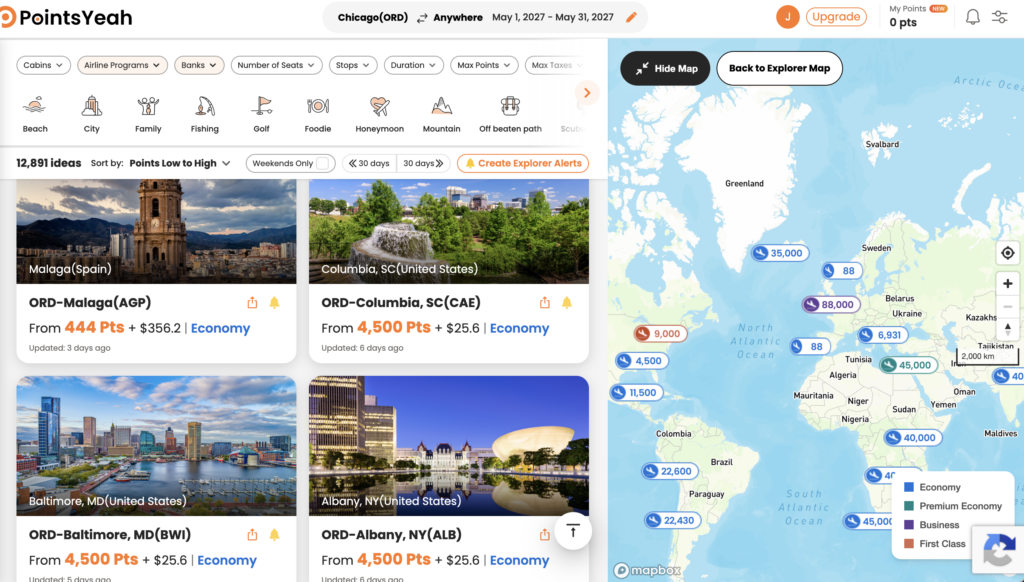
This one is probably my favorite. I think it has the best capabilities at the free level. It allows you to search by date or date range and narrow down with several filters. You can expand your availability to a large number of airports making it useful for positioning flights or just exploring options. The free version allows you to set up to four award alerts.
The paid version ($19.99/month or $119 annually) allows you to set 32 award alerts in addition to hotel search capabilities and the ability to track points balances across yourself and your family. Although I’m not sure I’d ever use that feature.
The feature I like the most about Points Yeah is the daydream explorer tab. This allows you to search incredibly broad searches by date, airport or region and just see what is available. You can narrow down cabin class, points programs, and more based on your needs. This is a great way to see what is available when you really don’t know where to start your search. This is also great for that “I have 200K United Miles and I don’t know what I can do with them over spring break” problem. Ask me how I know.
Seats.Aero
Okay, this is the tool that serious award-searchers often reach for! It has some really cool features. The interface is clean to use and the results come fast. BUT it’s most useful for people who already know what they’re looking for.
If you know you want to find flights from Chicago to Tokyo on ANA and you want to see all the available dates and partners to book on – Seats.aero is your tool. Plus its a really good way to look for business class availability. True beginners might feel overwhelmed by the tool – but once you know what you’re looking for, this is a gold mine. They even have unique tools like Qatar Q Suites finder, JAL First Class finder and more. Beginners may want to start with Points Yeah or Point.me and then graduate to Seats.aero.
The free version lets you search up to 60 days out. The paid version is $9.99/month or $99.99/year. The paid version allows you to search up to one year out (making this excellent for searching business class awards), get text alerts, search live results and have wider access to Rooms.aero – allowing you to search wider hotel availability too.
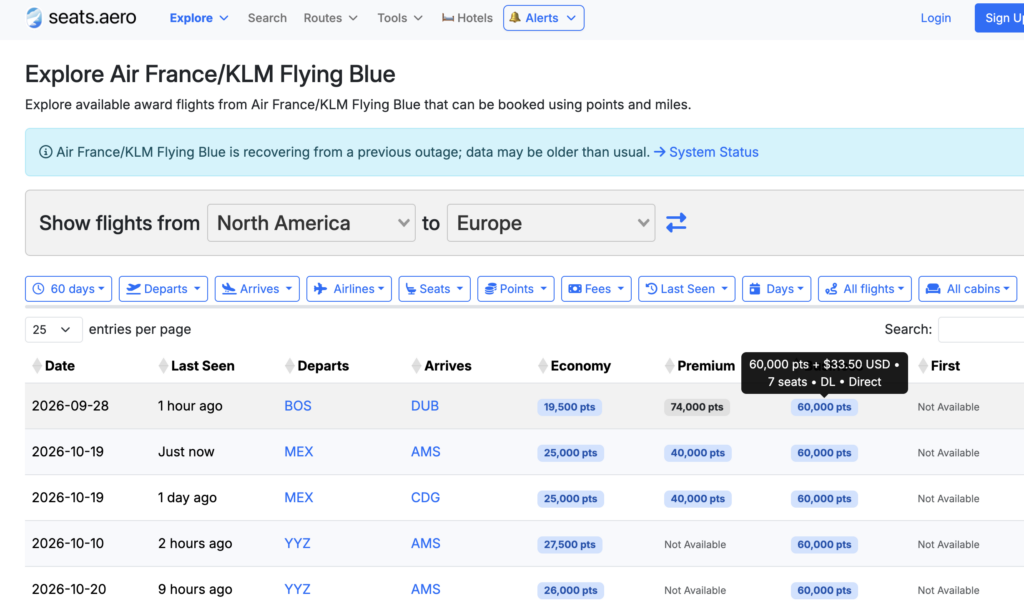
In the example below, I’m searching with Flying Blue points for availability to Europe. My search shows me that there is availability from Boston to Dublin for 60K Flying Blue points on Delta in business class. And there’s 7 seats available. Of course, I’d go to Air France’s website to confirm this first – but you probably see the power of this tool. Especially if you have flexibility with your dates.
Award Tool
Award Tool kind of reminds me of Points Yeah. The free version is fully functional for basic searches. The Panorama calendar view is really nice but free users can only access up to 90 days of search availability on this feature making it less impressive than Point Yeah’s similar feature.
The Pro version of Award Tool costs $9.99/month or $119.99/year – but they frequently have sales or discounts available. The Pro version gives you significantly more award search options and allows to search more complex flight needs as well as a staggering 100 alerts you can set.
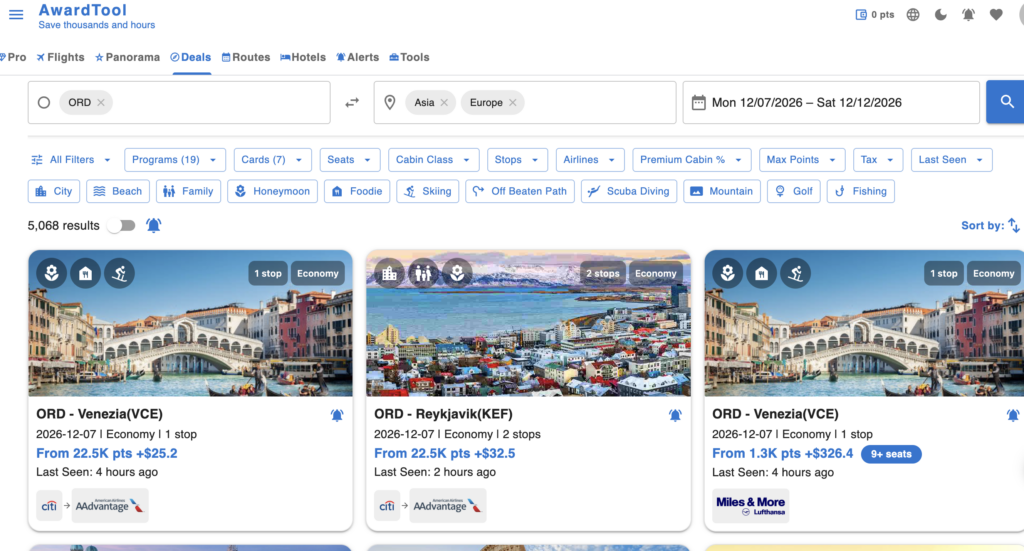
In the screenshot below, you’ll see that, similarly to Points Yeah’s Daydream Explorer, you can search for the best deals on a given range of dates and region. But with Award Tool, you can only go out as far as 90 days on the free version.
Roame
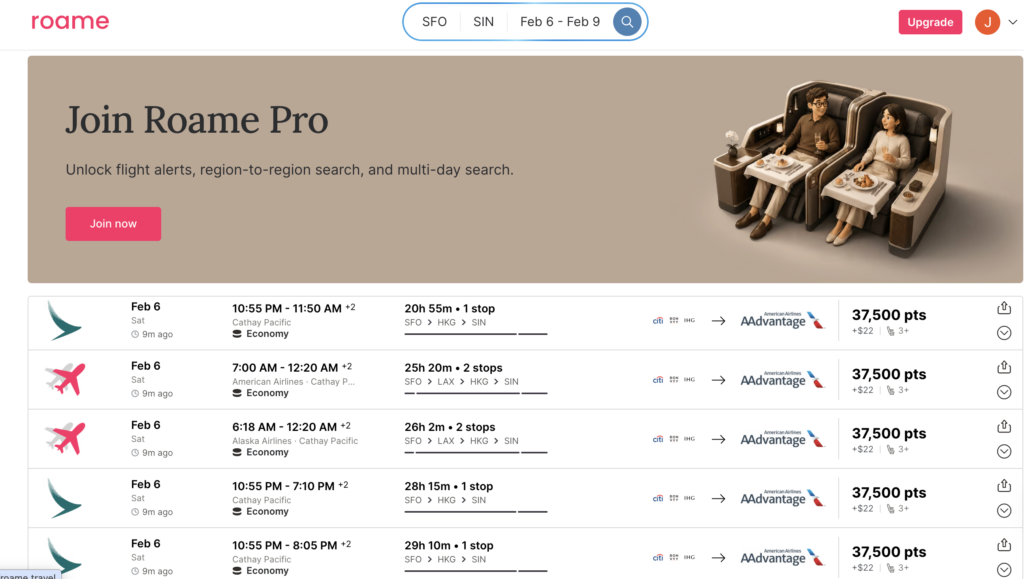
This is another tool similar to Award Tool or Points Yeah. It has most of the same functions including a “Sky View” which operates similar to Points Yeah’s Daydream Explorer tool. However the Sky View feature seems to only be part of the paid upgrade. At $12.99/month or $119/annually, I think I’d just stick with Points Yeah.
Roame does seem to be pretty good at finding Cathay Pacific and Singapore Airlines availability. While I didn’t compare it data point for data point, it consistently showed me availability that I could then find directly on the airline websites. So that may be something to keep in mind.
Point.me
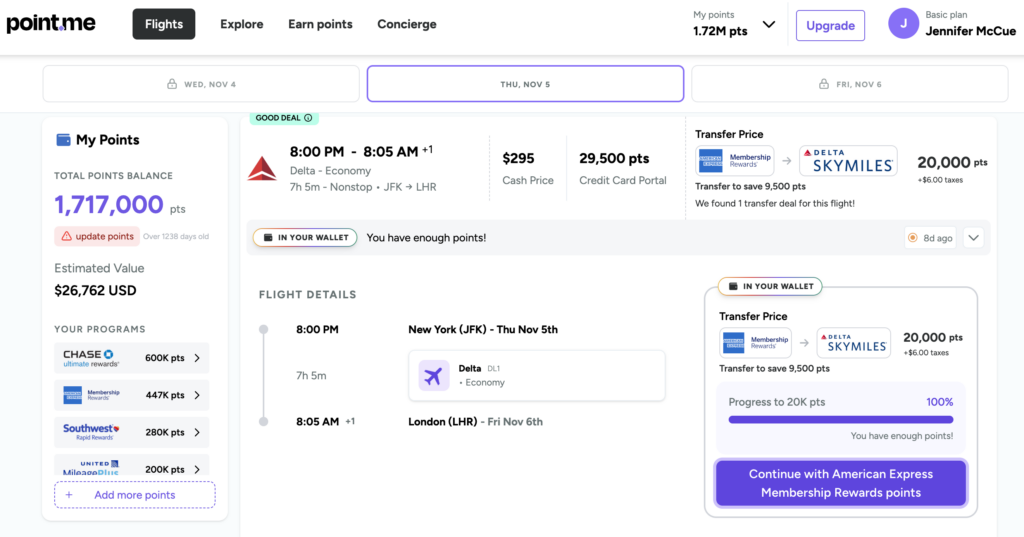
*My Favorite Paid Site* Most of the search tools assume you know how to book the award flights. Point.me does NOT make that assumption. They’re there to walk you through every step of the way. I actually love this site. But again, the search window is so narrow unless you’re on a paid version.
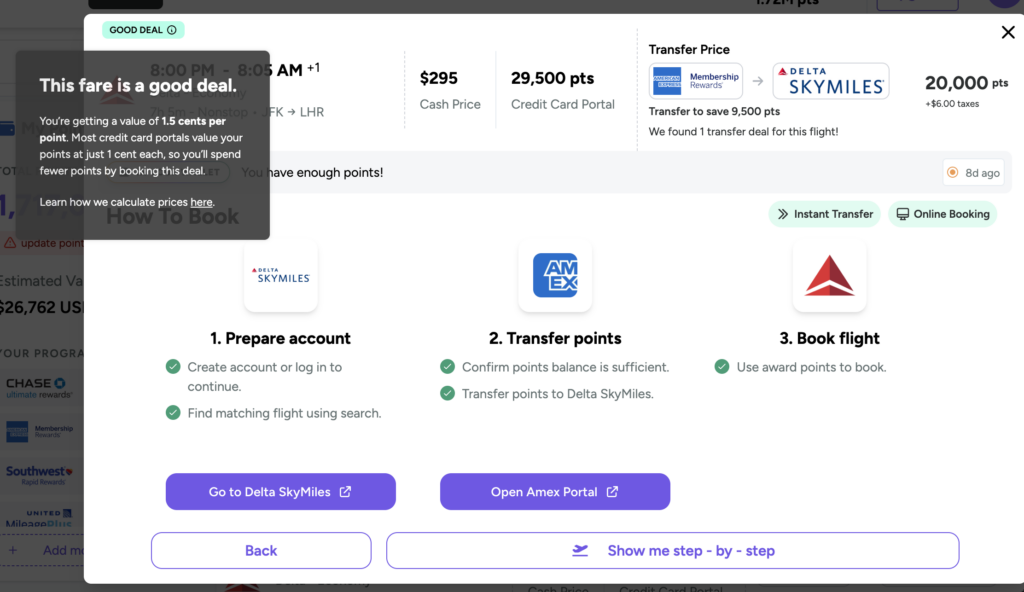
Point.me will guide you step by step through the booking process. You can even input the number of points you have in loyalty programs and it will tell you if you have enough to make the booking. Then it will show you transfer bonuses that are currently happening and walk you through each step of the process from transferring points to booking the flight.
The Standard paid plan is $19.99/month or $129 per year and gives you expanded search availability one year out, real time syncing of your points if you choose and even alerts for (points) price drops!
They have an additional Premium paid plan billed at $260/year which also includes a 1:1 strategy consultation and booking credit to have them book for you.
I actually like the Standard Paid version of Point.Me for beginners. I don’t know that you need to subscribe annually, but when you’re ready to book a bigger trip, I can see the value of paying $20 bucks for a month of searching and some step by step instructions – especially if this is one of your first redemptions!
In the screenshot below, you’ll see an example of an award search and how they really walk you through the steps.
Points Path Browser Extension (Chrome)
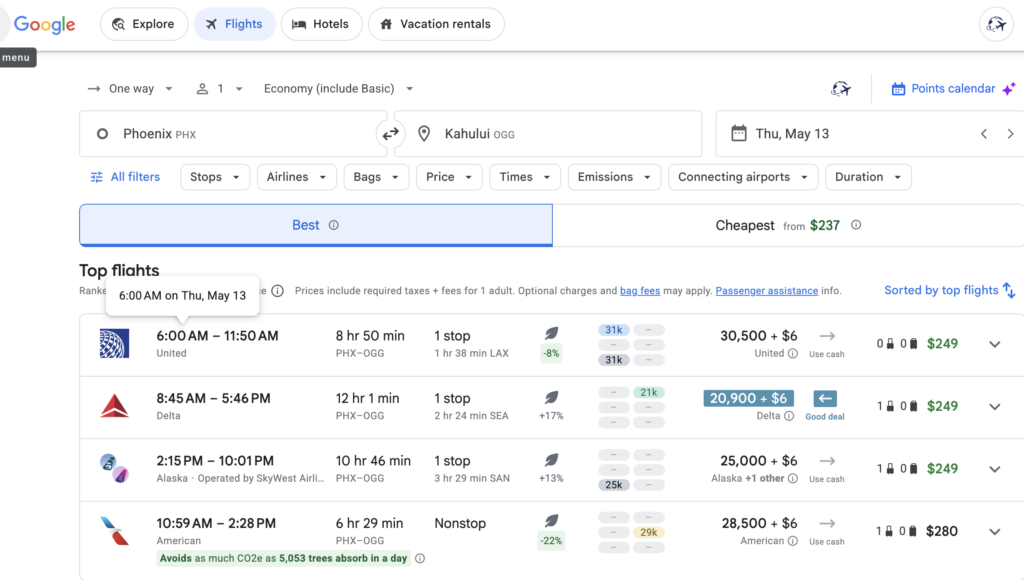
This one’s unique. It lives inside your Chrome browser and works behind the scenes. You search Google Flights like normal and Points Path shows up automatically along side the search results with award pricing for supported carriers.
At this time, the free version allows you to search U.S. based carriers while the Pro version ($79.99/year) allows you to search 17 programs including popular ones like Air France, Qatar, Air Canada, Turkish and Virgin Atlantic. The paid version also supports Delta and United cardholder discounts which can be convenient.
For people looking for a basic search tool, this is a really good entry point. Plus it’s nice to be able to compare cash fares to points fares on a site most are familiar with – Google Flights.
Hotel Award Search Tools
Most of the award search tools above cover hotel award availability to varying degrees. Points Yeah and Seats.aero (via Rooms.aero) are both worth using for hotel availability. But there’s a few tools that are specifically designed for hotels.
Open Hotel Alert
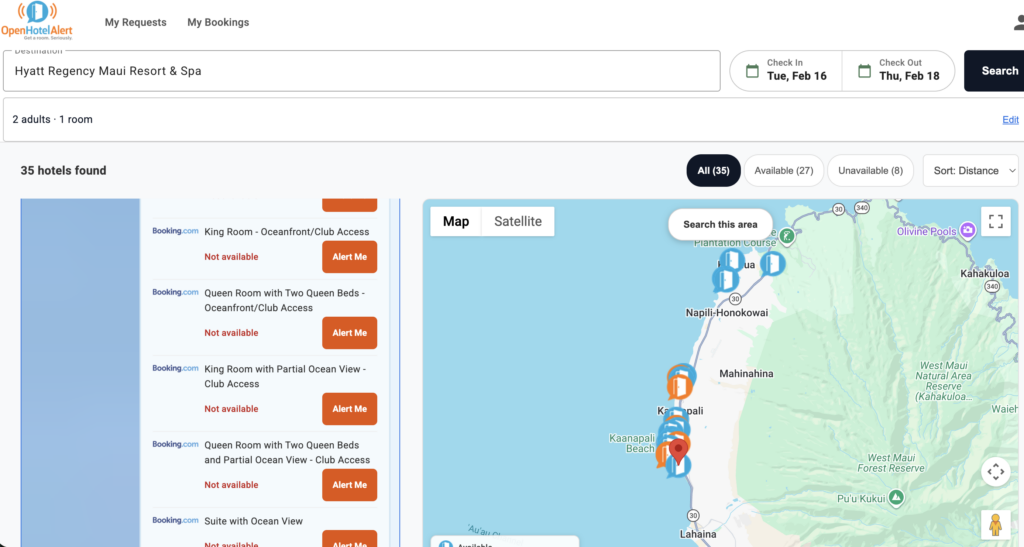
We finally have an award search tool that’s completely free for all features!! This site is great for monitoring sold out room types. Hyatt lovers rejoice – if you’re looking to apply a suite upgrade award or something similar, this program will alert you when. your room type is available. Once you’re alerted, you can contact Hyatt to apply your award. This is probably the favorite way I’ve used this program.
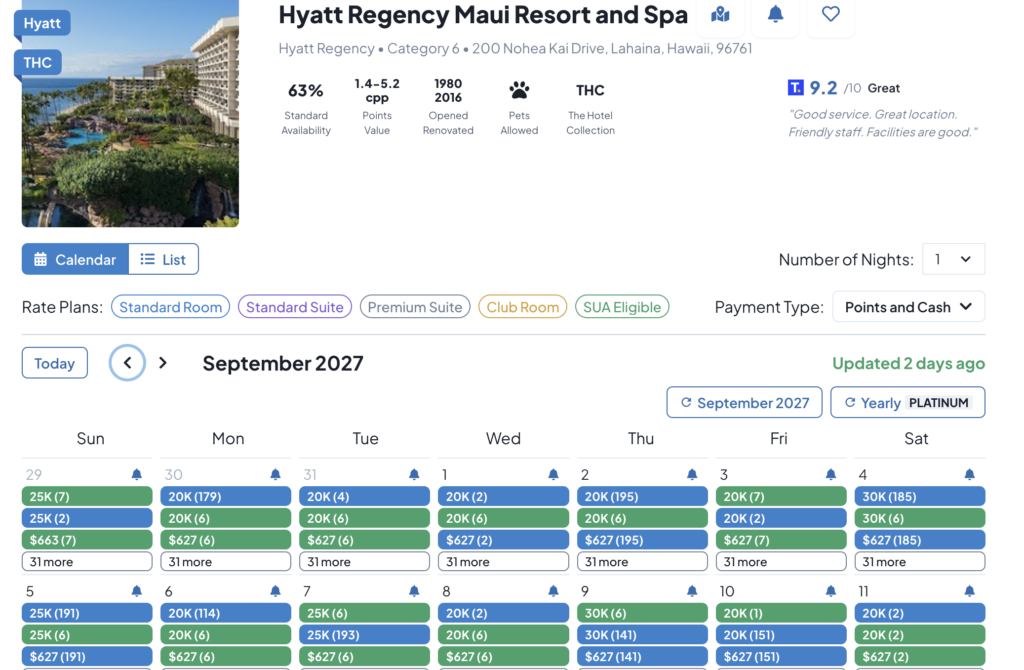
In the photo below, I’m looking for club access awards at the Hyatt Regency Maui. They’re sold out for my preferred dates. But with Open Hotel Alert, I can set an alert and will be notified if/when it’s available.
Max My Point
I really like Max My Point. This hotel award search tool goes a little deeper than most others. Not only does it show you award availability, but it shows you historical redemption rates so you have an idea of how likely it is that you’ll be able to find availability – as well as what typical award pricing costs.
Additionally, it shows you (roughly) how many of each room type are available – which is great for Hyatt loyalists looking to go for suites or use suite upgrade awards. Max My Point can even alert you when a suite upgrade eligible room becomes available – something I don’t think any other program does.
Their free version is good for basic searches. However it’s not without limitations. The free tier limits your hotel views to 10 per day and monthly calendar views to 12 per day. If you’re doing in depth searches, this will be a limiting factor. The Gold and Platinum tiers give you more daily searches and other perks as well.
Max My Point has one particularly unique tool for American Express Platinum Card® holders: the ability to search Fine Hotels + Resorts® for dates/properties that make the Fine Hotels + Resorts® credit worthwhile. This can be a great way to use up any Fine Hotels + Resorts® credits without breaking the bank.
Where To Start
So with all these tools, is your head spinning yet? I’ll be honest, mine does when I try to remember what all the benefits are of each tool. So here’s my two cents:
If you’re brand new to award searching (and even if you’re not!): I’d start with Points Yeah. The free version is among the most generous that are out there and the Daydream Explorer tool is a great way to get some inspiration or narrow down trip ideas when you need a little nudge. Plus the user interface is clean and easy to manage.
For flights: I’d probably start with Points Yeah for the reasons listed above. Seats.aero is probably my pick when you need some serious help narrowing down specific routes, aspirational flights and want fast results. Point.me is the winner if you want step by step instructions on how to book what you find.
For hotels: Points Yeah or Rooms.aero (Seats.aero’s companion) would be my recommendation for general searches. Max My Point is the obvious choice for Hyatt loyalists looking to apply suite upgrades or want to go deep on availability data.
For Google Flights Users: Add the Points Path Chrome extension and let it run in the background. It costs you nothing and shows you miles pricing automatically on every search you do. This is another good starting point for users – especially if your points stashes happen to be in domestic programs.
A Few Important Reminders
- These search tools search cached results – meaning it’s not live inventory. So any time you find a result, you always check availability directly on the website. If you’re looking at partner award availability (remember, that’s when you’re booking a United flight but using a different currency – like Avianca LifeMiles) I’d confirm award availability on two partners if possible. This minimizes the chance that you’re looking at phantom award availability.
- Transferring points is a one way road. And it’s usually instant. Transfer when you’re ready to book the award flight.
- Most of these tools offer a free tier. Start with those, use them to search and see which ones appeal to you. Which ones do you find yourself going back to over and over? Those are the ones that you may consider paying for in the future.
Questions about which tool is right for you? Reply to Amber On Points here!
-Jenn McCue from @pointingthewaytomemories


Terms apply to American Express benefits and offers. Enrollment may be required for select American Express benefits and offers. Visit americanexpress.com to learn more. For Capital One products listed on this page, some of the above benefits are provided by Visa® or MasterCard® and may vary by product. See the respective Guide to Benefits for details, as terms and exclusions apply.
EDITORIAL NOTE:
Opinions expressed here are the author’s alone, not those of any bank, credit card issuer, hotel, airline or other entity. This content has not been reviewed, approved or otherwise endorsed by any of the entities included with the post.
Amberonpoints is part of an affiliate sales network and may earn compensation when a customer clicks on a link, when an application is approved, or when an account is opened. This relationship may impact how and where links appear on this site. This site does not include all financial companies or all available financial offers. We appreciate it when you use our affiliate links as it supports our content at no cost to you!
Terms apply to American Express benefits and offers. Enrollment may be required for select American Express benefits and offers. Visit americanexpress.com to learn more. For Capital One products listed on this page, some of the above benefits are provided by Visa® or MasterCard® and may vary by product. See the respective Guide to Benefits for details, as terms and exclusions apply.
EDITORIAL NOTE:
Opinions expressed here are the author’s alone, not those of any bank, credit card issuer, hotel, airline or other entity. This content has not been reviewed, approved or otherwise endorsed by any of the entities included with the post.